How Studywork works
The quickest way to understand Studywork is to try it. Choose your child's grade on the homepage and tap a subject. Answer as your child would. About a minute, no sign-up needed.
What happens when you tap a subject
- A flashcard. From this term's work in that subject. Turn it over to see the answer. Every session starts with three deep breaths; you don't have to do them.
- One question. A middle cognitive level question you answer in your own words. Try a partial or wrong answer to see how the tutor responds.
- The tutor. Your answer is marked against the curriculum's answer, and the tutor replies the way it would to your child.
Nothing you type is kept.
What happens behind each answer
The answer comes from the curriculum, not the AI.
Every question is written from your child's school curriculum and carries the right answer and marking notes, and every question set is checked by our team. Two Gemini markers read every answer, and any disagreement is looked at by our team.
Studywork gets to know your child.
The tutor keeps short notes on how your child learns, like what clicked and what needs another look, and uses them to shape the next session. Your child never sees them, and they are never used to train anyone's AI.
More on how we look after your family's information: Privacy.
What I showed my children
A more technical look, if you're curious.
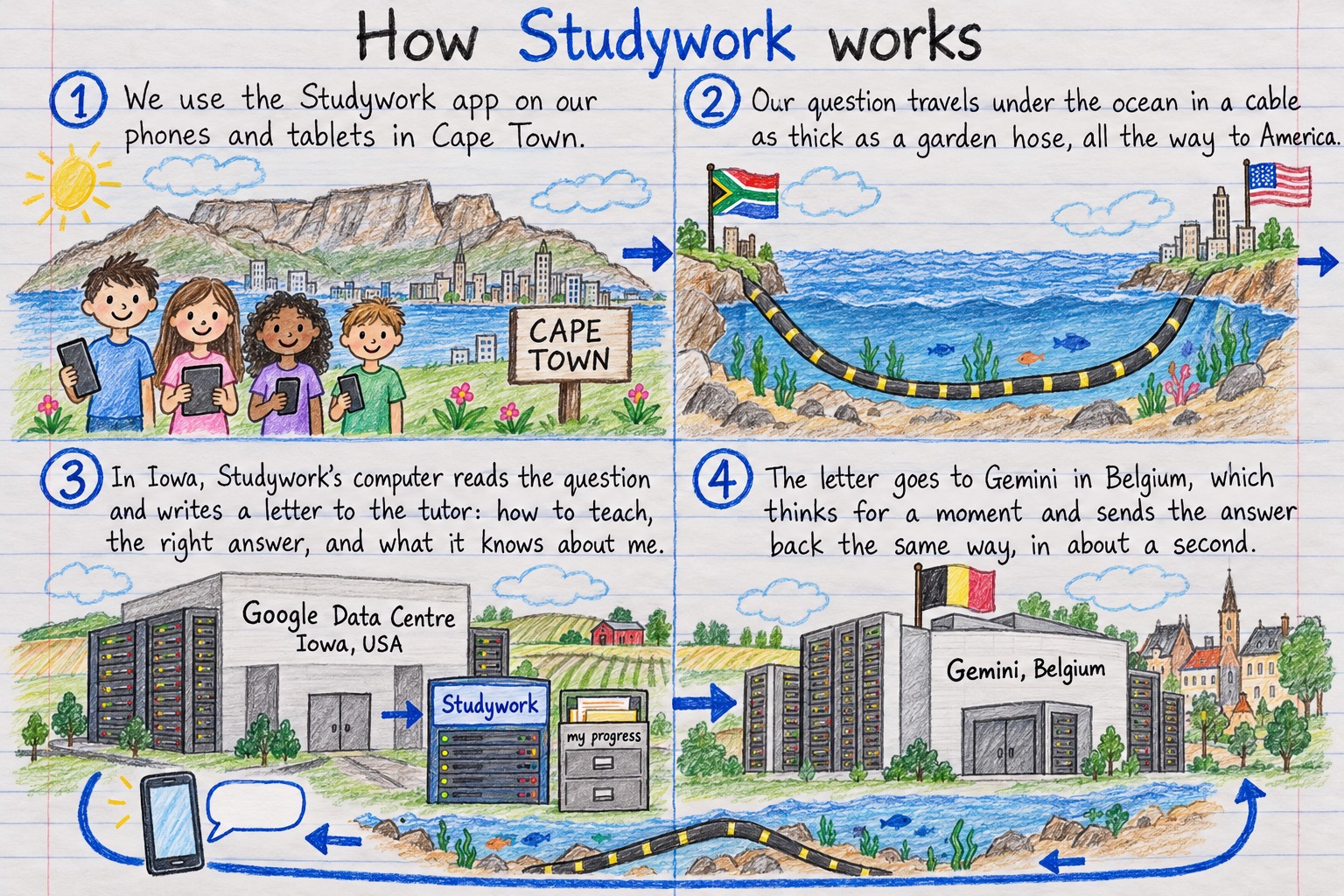
When my children and I planned Studywork, we drew it and I wrote out the letter the app sends the tutor. Here they are, if you'd like a closer look.
The journey of a question: the architecture
The letter to the tutor: the API engineering
Every time you send a message, the app doesn't just forward that one line to the tutor. It builds a whole letter first. It starts with "how to be a good teacher", then picks a voice: the companion. Then it drops in the actual question, along with secret notes on how to explain it properly. Then it reminds itself what it already knows about you specifically, like a teacher who remembers what you're good at, and where you might need a bit of encouragement. Then it adds today's progress, what language to talk in, and the whole conversation so far. And finally, right at the bottom: your message, your question to the tutor, or your answer to its question. Then the whole letter is sent, and the tutor replies to it.
That is why the tutor marks the way school marks, and why it can't simply hand over the answer: the secret notes travel with every single question.
Here's that letter-building, written as real code. Well, pseudo TypeScript, close enough to the real thing to be honest.
function buildTutorPrompt(student, question) {
  let prompt = "";

  prompt += howToBehave();                     // "be kind, be patient, teach — don't just answer"
  prompt += mascotVoice(student.mascot);       // e.g. "Clover"

  prompt += theQuestion(question);             // the question + the right answer + how-to-teach-it notes

  const memories = [
    "good at fractions",
    "asks intelligent questions",
    "responds well to encouragement, not pressure",
  ];
  prompt += whatIKnowAboutThisKid(student, memories);  // <-- the "memories"!

  prompt += howFarTheyveComeToday();           // progress so far this session
  prompt += whatLanguageToSpeak(student.home); // "English", "Afrikaans", "isiZulu", "Setswana"...

  prompt += everythingSaidSoFar();             // the whole conversation, in order
  prompt += student.newMessage;                // always goes LAST

  return prompt;                               // one big letter, sent to Gemini, fresh, every single time
}
What the symbols mean
| Symbol | Name | What it means |
|---|---|---|
function name(...) { } | function | a named recipe: "do these steps, in order, whenever I'm called" |
student, question | parameters | the ingredients this recipe needs handed to it |
let / const | variable keyword | "I'm about to give something a name so I can use it again" — let can change later, const is fixed once set |
prompt | variable | a box with a name, holding the growing letter |
+= | "add and keep" | take what's in the box, and stick this new bit onto the end of it |
"" | empty string | an empty box to start with — no letter written yet |
howToBehave() | function call | go run that other recipe right now, and give me back its result |
// text | comment | a sticky note for humans — the computer skips over it completely |
[ "a", "b" ] | array, or list | an ordered list of items, like a shopping list |
return | return | the recipe is done — hand this back to whoever asked for it |
In the "memories" step, the app puts what it knows about you into its own words, so the tutor can speak to you the way someone who knows you would.